
Debit or Credit a Gift Card
From the Member Profile screen, a Customer Service Representative can adjust the balance on a Member's existing Gift Card, either by crediting the Gift Card with additional funds, or debiting funds from the Card's current balance.
To adjust the balance of a Member's Gift Card:
-
Select Members from the top navigation bar, then select CSR > People from the side navigation menu. The People screen is displayed.
-
On the People screen, search for and select the desired Member (see
-
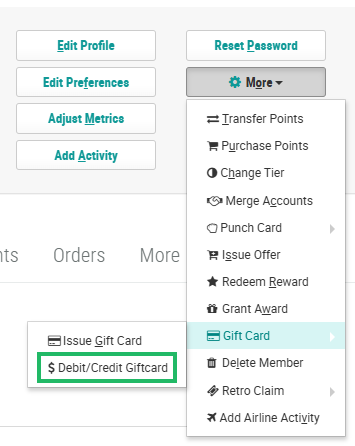
Within the header section of the screen, click More > Gift Card > Debit / Credit Gift Card. The Debit / Credit Gift Card pop-up window is displayed.
-
Select either Debit (to deduct from the Member's balance) or Credit (to add to the Member's balance).
-
From the Card Number drop-down menu, select the Member's Gift Card that you want to adjust.
-
In the Amount field, enter the amount of the adjustment.
-
Optionally, in the Description field, enter an explanation for why you are making the manual adjustment.
-
Click Submit.
